Keymap
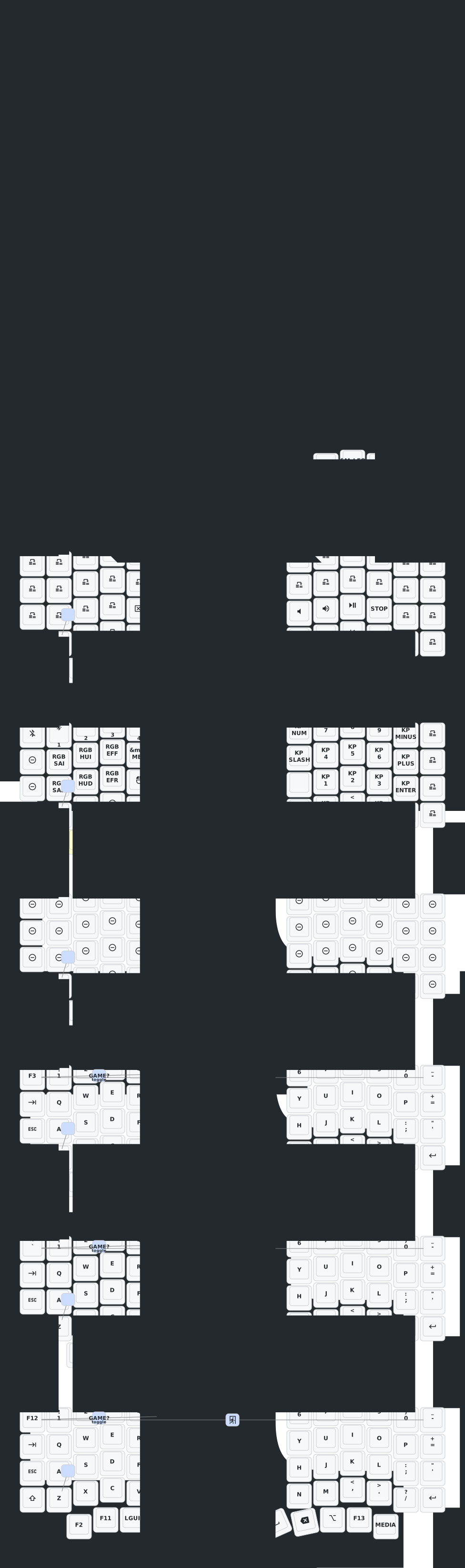
The keymap is the heart of the firmware. This drawing is
keymap-drawer/eyelash_sofle.svg, which the Draw Keymap workflow regenerates
from config/eyelash_sofle.keymap on every change; the site rebuilds after
it. The layer pages below draw each layer again on its own, from the same
keymap, and explain what the drawing can’t.
The PDF is four A4 portrait pages: a one-page summary of the basics, then every layer’s grid, three to a page. It is printed from the print view on every site build, so it matches the keymap the site shows.
Layers
| # | Name | How to get there | Back |
|---|---|---|---|
| 0 | BASE | always on | |
| 1 | NAV | hold mo(NAV), left thumb | release |
| 2 | CODE | hold mo(CODE), right thumb (position 60) | release |
| 3 | MEDIA | hold mo(MEDIA), right-thumb outer key (position 63) | release |
| 4 | SYS|NUM | hold `mo(SYS | NUM)`, left thumb |
| 5 | GAME? | from SYS|NUM, tap the right-thumb outer key (position 63) | joystick centre |
| 6 | MINECRFT | picker, joystick up | top corners (0 + 12) |
| 7 | GAME | picker, joystick down: generic FPS/MOBA | top corners (0 + 12) |
| 8 | NOMANSKY | picker, joystick left: No Man’s Sky | top corners (0 + 12) |
Layers 1 to 4 are momentary: they last while you hold their key. Layers 5 to 8 are locked: they stay until you leave them (Gaming mode). The layer’s name shows on the nice!view, and the underglow takes its colour.
Key positions
Combos and hold-tap rules refer to keys by position, 0 to 63, counted left to right, top to bottom (hover a key in a layer grid to see its number):
Rows 0-3: 13 keys each (6 left, the joystick column, 6 right)   0-51
Row 4:    12 keys (thumbs and the joystick centre)              52-63
Some positions worth knowing: 14 Q, 28 S, 40
Z (soft off); 0 and 12, the top corners; 57 Backspace; 60
mo(CODE); 63 the right-thumb outer key. The joystick is 6 (up), 19 (down),
32 (left), 45 (right) and 58 (centre).